
Every productivity app I have ever installed lasted about a week. Not because the apps were bad, but because each one arrives with somebody else's mental model bolted onto your brain, and brains reject transplants. So I stopped shopping and built an Obsidian dashboard with Claude Code instead: one screen holding my 9-to-5, my side projects, my content pipeline, my workouts, my habits and my social life, all reading from markdown files that were already sitting in my vault.
It is not a to-do list with a nicer font. It is a heads-up display. I open it, I see the one thing that matters, I close it, and the day goes.
Below is what is actually on the screen, why each panel earned its place, how the calendar write-through works without a single API key, and how to build your own version without copying my brain.
What you'll get out of this
- The front-seat rule: why exactly one task is visible and where the rest go
- Time-block stones that write to your real Google Calendar in about three seconds, with no API key and no Zapier
- Why an art panel and a bookmark-revival panel belong in a productivity dashboard
- The exact build path: Claude Code for the logic, Claude design for the look, handoffs between sessions
Why every productivity system falls off after a week
I am not a naturally productive person. I hate most productivity systems. They are somebody else's operating model, and they fall off in a week because the friction of translating your life into their categories is higher than the value they give back.
What I needed was not another system. It was one picture. Everything on it, glanceable, a beacon that tells me where I am and what is next.
It's not a productivity system. It's a heads-up display.
That distinction changed what I built. A system asks you to feed it. A display just shows you the truth about your day and gets out of the way. Every design decision below comes from that one rule.
How the front-seat rule forces exactly one priority
The main panel is a racing seat. There is exactly one task in it. One. The seat belt is on, because the metaphor is that you are already moving, and a gauge next to it shows time running out.
Everything else lives in the back seat or the trunk. When something new becomes the priority, you drag it out of the trunk into the seat, and the thing that was in the seat slides back. Simple, physical, visual. It is the 80/20 rule made literal: when you actually stop and think, you already know the one thing that moves the needle, and the rest can wait.
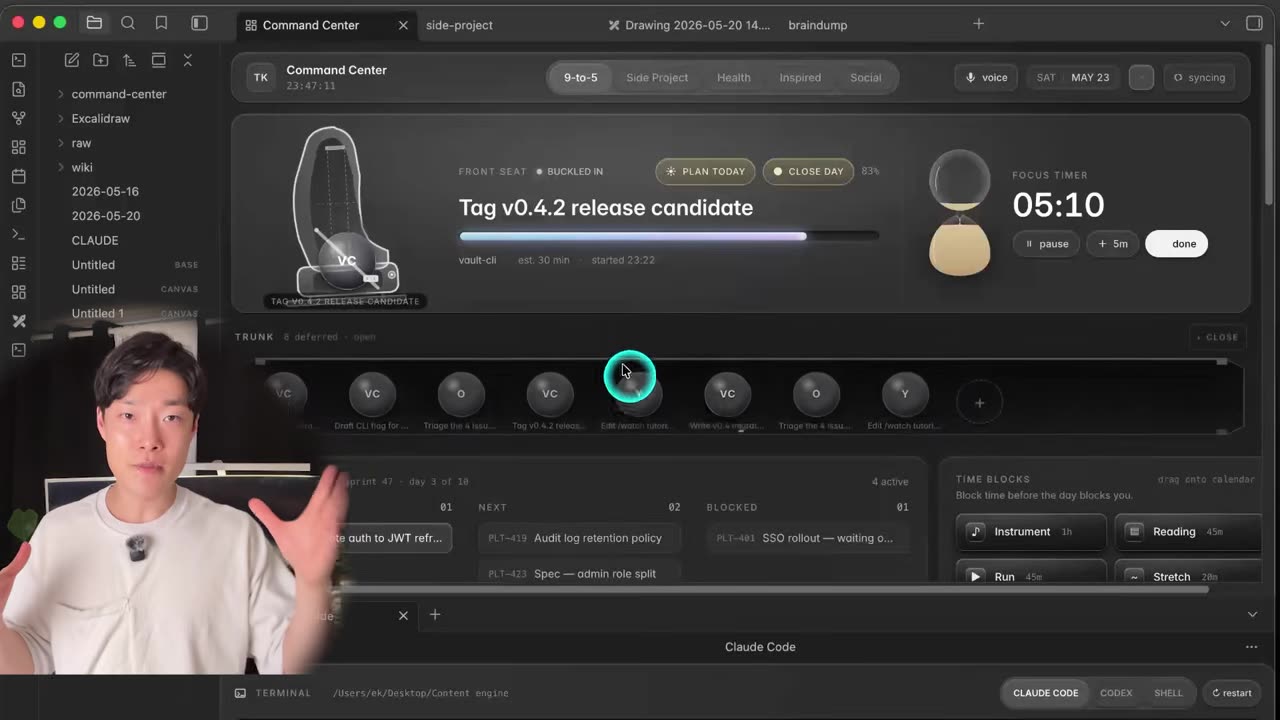
Underneath the seat is an hourglass with real falling sand. It runs a 25-minute focus block by default, in the pomodoro tradition, and it is adjustable. I run 30 minutes most days; 45 to 50 is my ceiling before my body wants to move. Anything past an hour of claimed pure focus is usually a lie you are telling yourself.
How time blocks write straight into Google Calendar
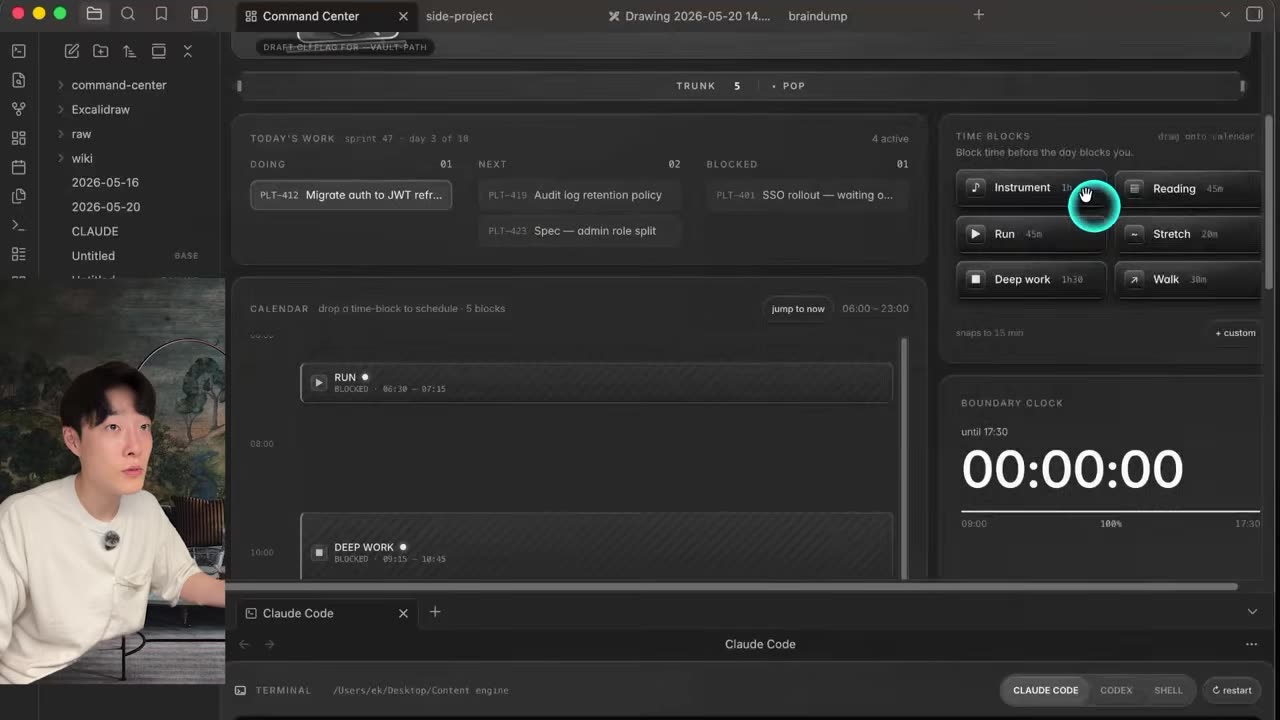
The calendar panel uses time-block stones: deep work, reading, run, instrument practice, stretch. You drag a stone onto the timeline and the slot fills with a striped pattern, which means committed. Not a suggestion. Time I told myself I would spend.
The reason this panel exists is embarrassing but universal. If I do not block creative time, instrument time or family time, it simply does not happen. Blocking it also kills the guilt, which is the real blocker. You will not stretch for twenty minutes in a busy afternoon if you feel like you are stealing the time from work. If it is on the calendar, it is not stolen.
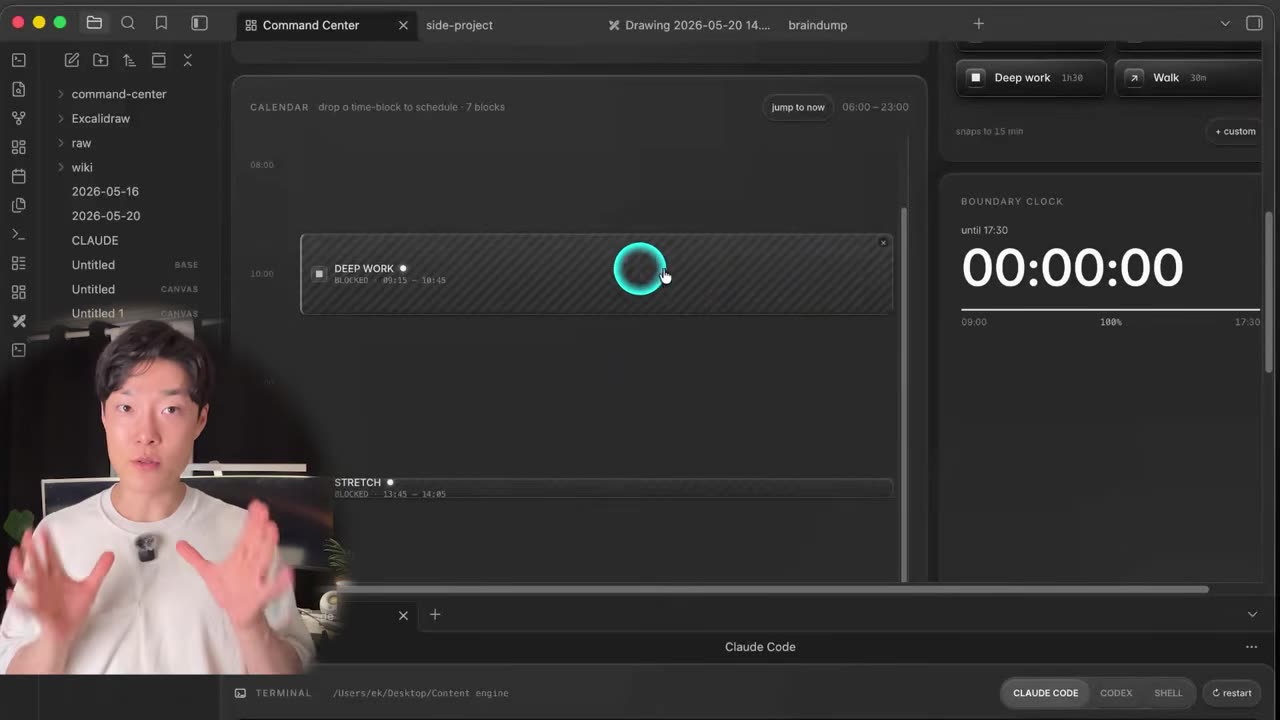
Here is the part that surprised people: those blocks are not local. Drop a stone and it writes through to the actual Google Calendar in roughly three seconds, and the calendar pings me when the block starts. No API key pasted into a config file, no OAuth screen, no Zapier sitting in the middle taking a cut. It rides the calendar bridge that already exists on the machine.
How the dashboard and the Obsidian vault stay in two-way sync
The side-projects tab holds every to-do for the SaaS work, the widget app and the business I am building with a real team of developers, PMs and designers. Those to-dos are not database rows. They are markdown files in the vault. Tick one off in the dashboard and the file updates. Edit the file in Obsidian and the dashboard updates. Two-way, no export step, no lock-in.
That single decision is why the thing survived. If the dashboard died tomorrow, I would still have every note, task and log as plain text. It is the same principle behind the second brain I run on Claude Code, and it is the reason both systems compose instead of competing.
The terminal and the ops column
The terminal is embedded in the dashboard too, running Claude Code and Codex, so I am not opening a separate terminal or VS Code to make a change. Next to it sits the YouTube ops column: scripts drafted, videos shot, next upload.
That column is the front end of the editing pipeline I automated with Claude Code. There is also a Slack briefing panel, because threads scattered across a dozen channels turn into noise fast, and what I actually need is a short list of what needs a reply.
What an art tab is doing in a productivity dashboard
This is my favourite panel and the one nobody expects. A dashboard is not a to-do list, it is life navigation, and life includes the thing that gives you energy back.
Daisy Fancourt, a professor at UCL, published a book on what art does to people: getting art into your day-to-day life lowers depression, reduces inflammation, drops cortisol, and lifts energy and mood. I did not need convincing. The further I drift from art, the worse I feel; the more I surround myself with books, lyrics, paintings and space, the more energised I get.
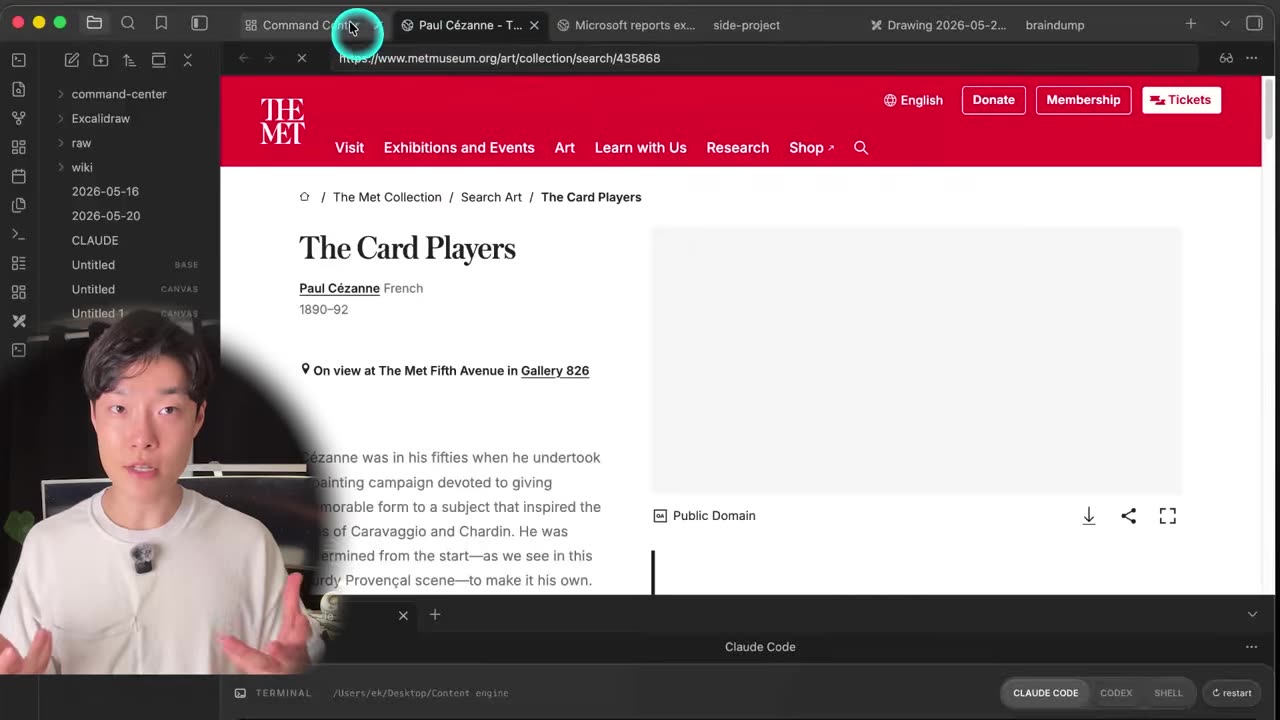
So the panel serves one real piece of art, music or lyrics a day, rotated fresh, with a short history of what it is and what it represents. Alongside it:
- Language. Two to four phrases a day. I used to have a bot message me every three hours to force repetition; putting it on the dashboard is quieter and it still adds up.
- Quote of the day. Pulled from an archive file of lines that actually moved me, not generic productivity slop.
- Bookmark revival. Three saved links a day, rotated. I have thousands of "read it later" bookmarks that I have never once gone back to. Now they get exhumed, and my first instinct about them is usually right.
- Brain dump. Idea hits, hit enter, saved with a timestamp to a markdown file. Searchable later from anywhere.
Your brain is a looping machine. If it is going to run something on repeat all day anyway, better it loops a line from someone great than the negative thought you woke up with. That is the entire argument for the language and quote panels.
How the current-events panel filters the AI firehose
You still need to keep up. You just cannot keep up the way the platforms want you to, with X and the YouTube algorithm feeding you the same take five times and AI influencers reading sponsor copy at you. In an era this loud, a filter is not optional.
The current-events panel pulls trending Reddit posts across five AI subreddits and scores the same story against itself across them, so what surfaces is the source, not the commentary. That gives me raw signal I can make a decision on. If you want the aggressive version of this idea, it is the same logic as cutting an agent down to the work that actually matters: less input, better filtering, same outcome.
X killed the free API and the public mirrors broke with it, so the tweets section is hand-curated for now. It can be automated, there are several ways, but I am not going to pretend it is running itself while you watch a static list.
The bigger point is what the panel replaces. Every time I open YouTube to put on a podcast, I end up watching shorts or a fight I missed last week. The algorithm knows my weakness and it will use it. This dashboard is my firewall: I see what I need, and I close it. Links open inside the dashboard so I never have to leave and come back through a feed.
How the day opens and closes
Morning: I hit plan today. It reads my notes and my Google Calendar, lays out what the day actually contains, builds the time blocks and puts them on the dashboard. Then I buckle in, which means one file goes in the front seat and I stop thinking about the schedule.
Evening: I hit close day. It logs everything I did. Whatever is still open, I trunk. Out of seven leftovers on a typical day, most are unimportant by definition, because the 80/20 rule already sent the important one to the front seat that morning. They carry over without guilt.
What the social tab tracks
The social tab tracks what I call omni cadence, which is output cadence rather than follower count, because cadence is the only part of the game you control. It also watches comments, since those are the things I genuinely do not want to miss.
And there is a daily dose of autobiography, which sounds soft until you notice why it works: read enough of someone's story and, when you hit your own adversity, your brain reaches for how they acted. It is the cheapest resilience I know.
How to build your own with Claude Code and Claude design
The build itself is not clever. It is a conversation.
-
Start from the kit, not a blank vault
Download the prompts and sources from the video description or the community. None of this lives in the Obsidian community directory; it sits on GitHub so you can fork it and do whatever you want with it.
-
Talk to Claude Code about your brain, not mine
"Customise this part. Get rid of that section. Add this feature. Change this number to mine." This is a personal tool built for one person, so assume half of it will not fit you. Cut it. The panels you keep should be the ones you would actually look at.
-
Let Claude Code write the Claude design prompt
For the look, the colours, the layout, the racing-seat shape, I used Claude design and a four-step process for getting real design out of it. The move that made the difference: I asked Claude Code to write the exact prompt to paste into Claude design, with every detail supplied, so the design tool never had to guess my intent. You do not need another design tool. A $20 subscription covers this.
-
Iterate in short sessions and hand off
This was the longest context I have run. Features added, tested, thrown out, added back. I spent an entire session plus a handoff on the racing seat alone, which you do not have to do, because I have an obsessive personality and you probably have a life. Build one panel per session.
See the front seat, the stones and the calendar sync in motion
Static screenshots undersell a dashboard whose whole point is that it moves — falling sand, dragging stones, blocks landing in Google Calendar. The 13-minute walkthrough shows every tab, and the kit is in the community if you want to fork it tonight.
Frequently asked questions
What do you need to build an Obsidian dashboard with Claude Code?
Obsidian with a vault you already write into, Claude Code in your terminal, and the starter kit of prompts and sources. Design work happens in Claude design, which a $20 subscription covers. No Zapier account, no API keys, no paid automation tier. The dashboard is a local interface over markdown files you already own.
Does the dashboard actually write to Google Calendar?
Yes. Dropping a time-block stone on the timeline writes through to the real Google Calendar in about three seconds, and the calendar pings me when the block starts. There is no API key to paste, no OAuth screen and no Zapier step in the middle. It rides the calendar bridge that is already on the machine.
Is this an Obsidian community plugin I can install?
No. It is not in the Obsidian community directory. The build lives on GitHub so you can download it, fork it and rewrite whatever you want. It is a personal tool shaped around one brain, so treat it as a starting point rather than a finished product and cut the parts that do not fit you.
How long does it take to build a personal command center like this?
Getting a working version from the kit is one conversation with Claude Code. Getting the version I actually use took the longest context I have ever run, plus session handoffs and a lot of features that were added, tested and thrown out. One racing-seat animation alone ate a full session. Ship the plain version first.
Why does the dashboard only allow one task at a time?
Because it is the 80/20 rule made physical. One task sits in the front seat, everything else goes to the back seat or the trunk. When you genuinely think about it, you already know the one thing that moves the needle. Most deferred items turn out to be unimportant and carry over harmlessly for days.