
The MCP vs CLI question for AI agents sounds like plumbing trivia right up until you look at the bill. In one controlled benchmark on an identical task, going through MCP directly used between 4 and 32 times more tokens than a plain command line tool. Not because the model reasoned worse. Because of what was sitting in the context window before it started reasoning at all.
The mechanism is boring, which is why people miss it. That MCP setup loaded 43 tool definitions into context, and the agent then used one or two of them. Every schema, every parameter description, every enum in the other 41 got paid for anyway. Then paid for again on the next turn.
So I ran the opposite experiment. One coding agent, one focused command line tool, one build prompt. What came out was a live World Cup dashboard: current results, upcoming matches, a personalised road to the final, a shareable prediction builder, market odds and a model that plays the rest of the tournament out 20,000 times.
No API, no backend I wrote, zero data cost. Below is why the smaller interface won, and how to point the same move at whatever you check twelve times a day.
What you'll get out of this
- Why tool definitions are a fixed tax your agent pays before it does any work
- What the 4–32x MCP vs CLI token gap actually measured, and what it did not
- The free tool that turns any API or website into an agent-friendly CLI
- The four-step brief that got a working, testable dashboard out of one prompt
- When MCP is still the correct choice, stated honestly
Why your agent pays for tools it never uses
Here is the part nobody puts on the marketing page. When you connect an MCP server, its tool definitions become resident. They live in the prompt. Names, descriptions, full JSON schemas for every parameter, the little paragraph explaining what include_archived means. Connect four or five servers and you are carrying dozens of these before the agent has read your actual request.
The agent does not get to skim. There is no "read the table of contents first." The whole manifest goes in, every turn, and the model attends over all of it. Forty-three definitions to reach for one or two is not a rounding error. It is the majority of what you paid for.
I have written about the downstream version of this before, when I traced an agent that was quietly burning $18 a day. The finding was the same shape: the money never went to the hard thinking. It went to whatever was resident in the context window on every single turn, silently, forever.
--help, so the agent fetches documentation the same way it fetches data — when it asks.MCP vs CLI: what the numbers actually measured
Be precise about the claim, because the internet will not be. The benchmark compared direct MCP against a command line tool doing the same task, and the spread was 4x to 32x more tokens on the MCP side. That is a wide range on purpose. How badly you get hit depends on how many servers you have connected, how verbose their schemas are, and how many turns the job takes, because the tax repeats.
The ceiling is the number that matters. A 4x overhead on a one-shot lookup is annoying. A 30x overhead on a forty-turn loop is a different category of problem, and it compounds where you cannot see it: your context window fills with documentation instead of work.
This is not "MCP is bad." MCP is a protocol for structure, and structure sometimes earns its price. The failure is treating it as the default connector for everything, including jobs the shell solved in 1978.
Why a command line is a better interface than a menu
A GUI is built for human eyes. You click pictures and buttons because that is how humans navigate ambiguity. A CLI gives the same instruction with words. Type mkdir and the folder exists. Same computer, same result, much shorter path.
For an agent that difference stops being aesthetic. A CLI returns text, which the model already reads natively. It composes: output of one command becomes input to the next without a translation layer. It is deterministic enough to repeat. And critically, its documentation is lazy. The agent runs --help when it needs to know what exists, and otherwise pays nothing for the existence of forty other subcommands.
That is the whole trick, stated plainly. MCP is eager loading. A CLI is lazy loading. Everything else follows from that.
Imagine asking someone to tighten one IKEA screw. MCP hands them the catalogue, the parts list and the full instruction booklet. A CLI hands them a screwdriver and says: tighten this.
The one tool I gave it: Printing Press and the ESPN CLI
The tool in this build is the ESPN CLI from Printing Press, a free open source project that manufactures an agent-friendly command line tool out of an API, an app or a website. It also keeps a public library of tools people have already pressed.
The ESPN one already existed, so I reused it. Worth saying out loud, because AI videos have a habit of making simple work look complicated: if a good tool already exists, use it. You do not get bonus points for rebuilding the screwdriver.
# install a tool that already exists in the public library
npx -y @mvanhorn/printing-press-library install espn

# then everything the dashboard needs, no API key, no account
espn-pp-cli scores soccer fifa.world
espn-pp-cli standings soccer fifa.world
espn-pp-cli odds soccer fifa.world
One scores command and real results land in the terminal. The same binary then hands over standings, the full schedule, team information and available odds. No API key, no account setup, nobody copying scorelines by hand into a spreadsheet at 2am.

One real gotcha from the build: the CLI's scoreboard subcommand defaults to --limit 100, which assembles a malformed query string and cheerfully returns zero events. Pass --limit 0, or use scores instead. Tell your agent this, or it will spend three turns debugging an empty array.
How I briefed the agent to build the dashboard
Claude Code and Codex both handle this. The logo on the agent is not the interesting variable — what matters is whether the agent can run the tool, inspect the result, create files and test whether the result is any good. Four abilities, in that order.
-
Get the data flowing before you mention design
Install the CLI and run it by hand until the output is boringly reliable. If the agent has to guess at the data source, every later decision inherits that uncertainty.
-
Write the brief as questions, not a feature list
I did not open with "add a bracket component." I put myself in the chair of someone actually watching the tournament and asked what I would genuinely want to know. What just happened? What match is next? What should I pay attention to if I support one particular country? How could my team reach the final? What would I want to argue about with a friend?
-
Turn each question into exactly one surface
Those questions became the product, and the technology came afterward: latest results, next fixture, a country selector, an interactive knockout path, a scenario builder, fun stats, all twelve group tables, market odds, and a clearly labelled tournament simulation. One question, one thing on the page.
-
Make the agent test its own work
Then I told it to open the page, click through every interaction and fix anything that broke. This single instruction is the line between asking AI for a mock-up and asking it for a product.
A mock-up only needs to look right. A product needs to work when someone touches it.
The prediction builder is easier to watch than to read: pick a country, change the opponent in each knockout round, and see the share card recompute the entire run in real time.
Watch that demo →What one page can answer when the data is cheap
The hero does the fast work. It carries the visual identity, but it also answers the two questions with the shortest shelf life: what just happened, and what happens next. Then the country picker makes that personal. Choose the United States, South Korea, Brazil or anyone else and the hero swaps to that nation's most recent result and next match. One control turns a generic tournament page into your tournament page.

Road to the final does something a normal bracket refuses to do. Pick a nation or hover a team in the round of 32 and its projected route lights up through every stage while the rest of the bracket fades back. A standard bracket makes your eyes hunt across thirty-two teams. This one tells a single team's story on sight.
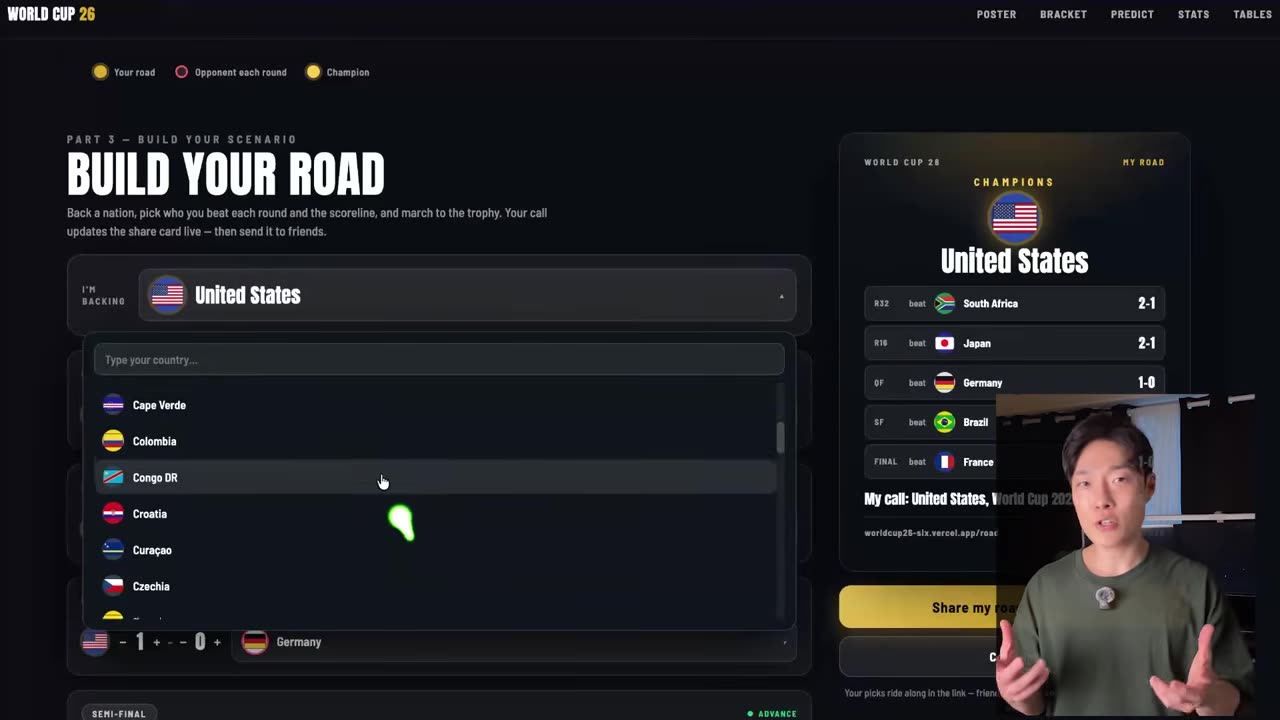
The prediction builder is where it stops being a dashboard and becomes something people send each other. You back a country, select its opponent in every knockout round, set the scorelines, and the share card updates with each choice. Win all five rounds and the card crowns your champion and summarises the run. You copy that exact scenario into a link, send it to a friend, and they disagree immediately, as friends do, and build their own.
That is a sharing loop, and it exists for a reason worth stealing: people rarely share a table of data. They share an opinion.
Stats, simulation and group tables
Under that, six stat cards compress the tournament into facts you absorb in seconds — biggest win, nation with the most goals, current title favourite, the group of death, total goals, and the teams with a perfect start.
The title race shows which team wins most often when the model simulates the rest of the tournament 20,000 times. The market section carries the current betting view, and twelve group tables show points, goal difference and each team's estimated chance of advancing.
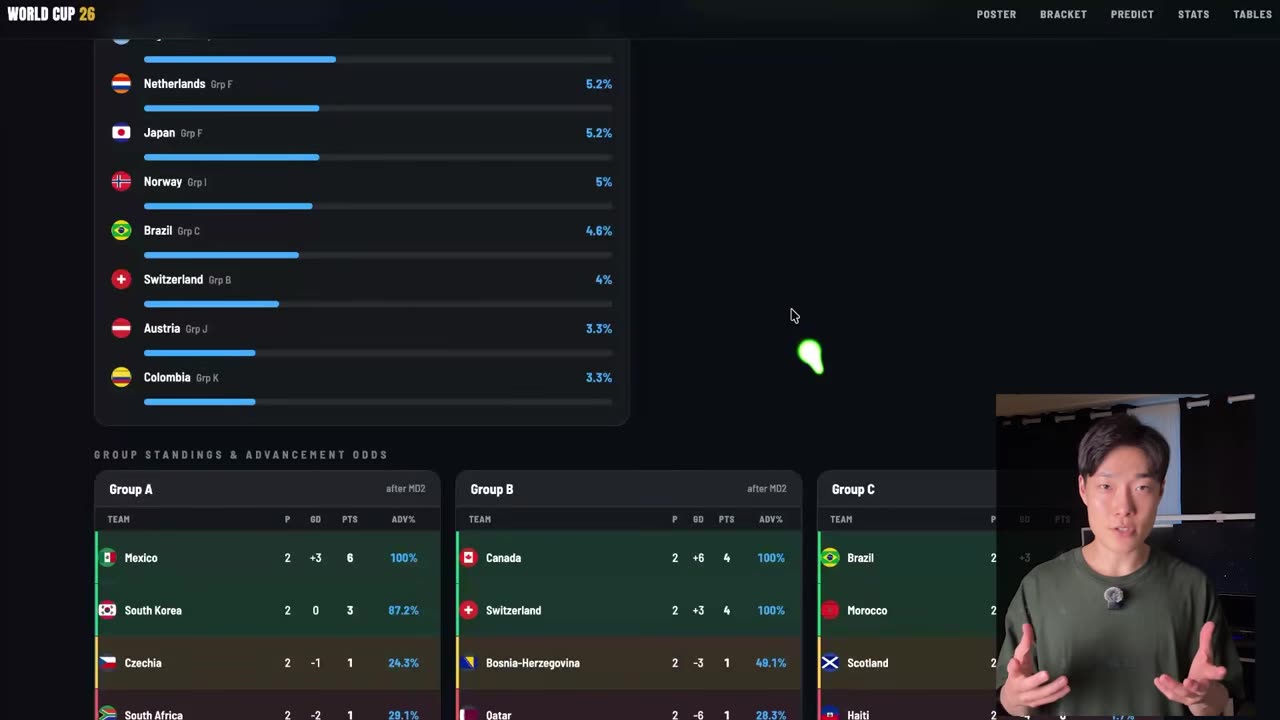
So one page answers at three levels: what is happening now, what could happen next, and what any of it means for my country. That structure is portable. The sport is not the point.
How to run this on something you check every day
You do not need a sports dashboard. Think of one piece of information you check repeatedly and resent checking: flight prices, product availability, appointment slots, competitor updates, industry news. Find one focused tool that can retrieve it, and ask your agent to turn it into one useful screen.
Start with a single question and a single reliable answer. Add features only when they make that answer more useful — that constraint is what keeps the build from sprawling into a half-finished platform.
It is the same discipline behind the command center I built to run my week and the editing pipeline that cuts my videos: one job, one interface, ruthlessly scoped. If you want the reading-and-recall version of this idea rather than the dashboard version, the second brain build applies the same rule to notes.
When MCP is still the right call
The lesson is not that CLI always beats MCP. That would be a worse rule than the one it replaced. MCP earns its cost when the structure is doing real work: typed schemas that stop an agent from guessing at arguments, stateful sessions, auth handshakes your shell has no clean answer for, or a service with no command line surface at all.
The honest rule is narrower and more useful. Give the agent the smallest useful interface for the job. Audit what you have connected and disconnect the servers you wired up once out of curiosity and never used — they are still in your context window, still billing you, still competing for the model's attention with the thing you actually asked for.
Fewer tokens, fewer moving parts, and a much shorter path from an idea to a working thing. Don't hand your agent the manual. Hand it the tool.
Watch the dashboard get built in seven minutes
The article gives you the argument. The video gives you the terminal output, the build prompt going in, and the prediction builder being clicked until it breaks and then not breaking. If you want the CLI-first agent setup pulled apart step by step, that happens inside AI Movers.
Frequently asked questions
Does a CLI really use fewer tokens than MCP?
In one controlled benchmark on the same task, going through MCP directly used between 4 and 32 times more tokens than an equivalent command line tool. The gap came from loading 43 tool definitions into context before the agent called one or two of them. A CLI carries no resident schema, so the agent only pays for the command it actually runs.
What is Printing Press and is it free to use?
Printing Press is a free, open source project that turns an API, an app, or a website into an agent-friendly command line tool. It also ships a public library of tools other people have already built. I did not write the ESPN CLI I used for the World Cup dashboard. It was already in that library, so I installed it and moved on.
Do I need an API key to pull live sports data?
Not for this build. The ESPN CLI needed no API key, no account signup and no paid plan, and the dashboard it fed has no backend I wrote. The agent ran the command, read the text that came back and wrote a self-contained page from it. Total data cost for the project was zero.
Should I delete all my MCP servers?
No. The lesson is not that CLI always beats MCP. MCP earns its cost when the structure is doing real work, like typed schemas, stateful sessions or auth your shell cannot handle. The rule is narrower than it sounds: give the agent the smallest useful interface for the job, and drop servers you connected once and never used.
Which coding agent did you use to build the dashboard?
Claude Code, though Codex handles this fine too. The logo on the agent is not the interesting variable. What matters is that the agent can run a shell command, read the result, write files and then open the page and test its own work. Any agent with those four abilities can reproduce this build.